
Parity Scrollr
Compare a design or reference site with the implementation, without losing your place between the two.
- Responsibility
- Design, engineering, and maintenance
- Focus
- Visual parity workspace
Get the app.
Chrome and Edge ZIP downloads. Install unpacked and update manually.
- Built with
- JavaScript · Manifest V3 · Canvas · IndexedDB
The comparison should not depend on your memory.
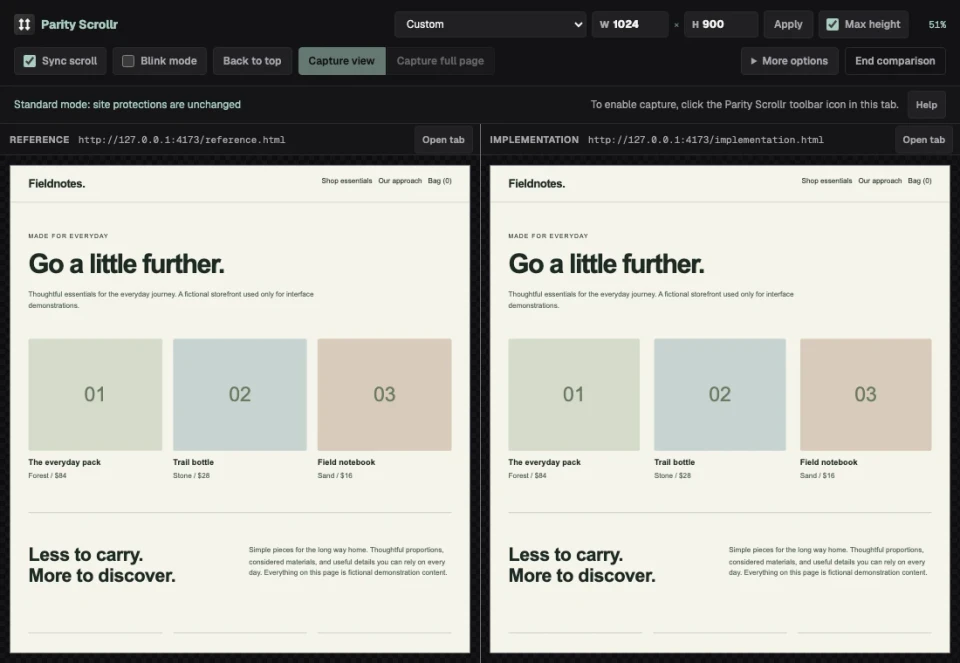
I built Parity Scrollr to keep visual review in one place. A reference page or local design export sits beside the implementation, with shared viewport controls and synchronized scrolling so a layout difference stays in view while you investigate it.
Switching between a design and a live page makes small differences hard to pin down. Different viewport sizes, scroll positions, and independently scrolling panels add noise before the actual review has started.
What I built.
- Side-by-side comparisons with pixel-locked page scrolling and synchronization for matching nested scrolling elements.
- Local PNG and JPEG design references, using the frame's authored CSS width rather than assuming export pixels equal layout pixels.
- Shared responsive presets, custom dimensions, optional URL parity, and Blink mode for inspecting differences in place.
- Visible and stitched full-page PNG capture, with scroll restoration and temporary Shopify preview-bar suppression during capture.
Coordinate two pages without taking over the browser.
Site access is scoped to the selected comparison. Compatibility mode applies only to approved origins in that comparison tab, and session cleanup removes temporary rules. Design images stay in the browser and are removed when the comparison ends. Compared pages still use their own network services.
Where it landed.
A focused Chrome and Edge extension distributed through GitHub. The comparison workspace, local image references, and capture tools work without an account or an extension-operated server.
Explore the other apps